
Strategic QuickBooks Training for Contractors: A 2026 Profit Protection Framework
- Wendy Okie

- May 21
- 12 min read
What if your most profitable project on paper is actually draining your company's cash flow in real time? With material costs remaining 42% above pre-pandemic levels in 2026, the margin for error in the construction industry has effectively disappeared. You likely feel the constant pressure of tracking complex retainage and change orders while fearing a massive tax-season cleanup that costs thousands. It's a common frustration to work hard in the field only to find your financial data is a disorganized mess that leaves you guessing about your actual bottom line.
This article provides a strategic framework for QuickBooks training for contractors that moves beyond basic data entry. We'll show you how to master the specific workflows that protect your construction margins and transform your books into a professional system ready for bonding or lending. You'll discover how to gain real-time visibility into project profitability and streamline your invoicing to speed up cash flow. We'll also cover why migrating to integrated cloud systems is essential for survival now that support for QuickBooks Desktop 2023 ends on May 31, 2026.
Key Takeaways
Shift from basic administrative data entry to a structural framework that aligns your accounting workflows with specific construction profit goals.
Evaluate the 2026 technology landscape to understand why cloud-based platforms are now the industry standard for maintaining real-time field-to-office connectivity.
Identify the core mechanics of job costing and Work in Progress (WIP) reporting through specialized QuickBooks training for contractors to ensure project margins remain protected.
Adopt a disciplined five-step roadmap to move from disorganized "cleanup" cycles to a state of permanent financial readiness for bonding and lending.
Discover how customized training using your actual company data transforms financial reporting from a compliance chore into a proactive strategic growth tool.
Beyond Data Entry: Why Strategic QuickBooks Training is Essential for Contractors
Strategic QuickBooks training is the deliberate alignment of software workflows with your specific construction financial goals. It's far more than learning which buttons to click for basic data entry. For a general or specialty contractor, true mastery means configuring the system to mirror the physical reality of the job site. When your software reflects your field operations, you transition from viewing accounting as an administrative burden to utilizing it as a strategic asset. In a 2026 market where material costs remain 42% above pre-pandemic levels, having precise, real-time data is the only way to maintain a competitive advantage during the bidding process.
Generic bookkeeping courses often fail because they treat every business like a retail shop or a simple service provider. These programs don't account for the unique nature of construction accounting, which requires a system capable of handling long-term contracts, fluctuating labor costs, and complex insurance requirements. Without specialized QuickBooks training for contractors, your team might struggle to track the very details that determine whether a project is profitable or a drain on your cash reserves. Accurate data allows you to spot trends before they become crises, ensuring your bids are based on actual historical performance rather than optimistic estimates.
The Cost of "Self-Taught" QuickBooks Management
Relying on a self-taught approach often leads to expensive year-end cleanups. Common mistakes, such as miscategorized job costs or forgotten change orders, create a distorted view of your company's health. You might think a project is performing well, only to realize later that unrecorded expenses have eroded your entire margin. This creates immense emotional stress for owners who feel they're working harder than ever but can't see the results in their bank accounts. Beyond the personal toll, messy data forces CPAs to spend dozens of hours fixing errors, resulting in professional fees that far exceed the cost of proactive training.
Building a Foundation for Scalability
A professional Chart of Accounts serves as the skeleton of your financial system. It provides the structural integrity needed to support rapid growth or complex project loads. When you invest in structured QuickBooks training for contractors, you're building a framework that prepares your firm for future lending and bonding requirements. Banks and sureties don't just look at your bank balance; they look for organized, reliable reporting that proves you understand your costs. By establishing these systems now, you ensure your business is ready for the opportunities detailed in our guide on Mastering QuickBooks for Contractors: The 2026 Strategic Guide. This disciplined approach moves you from "messy books" to a lender-ready position of strength.
Mastering the Contractor Tech Stack: QuickBooks Online vs. Desktop in 2026
The choice between accounting platforms has shifted from a matter of preference to a strategic necessity. As of May 2026, the industry has moved decisively toward cloud-based solutions. Intuit ceased selling new subscriptions for QuickBooks Desktop Pro and Premier Plus back in 2024; support for Desktop 2023 officially ends on May 31, 2026. This transition makes specialized QuickBooks training for contractors essential for firms that want to avoid being left with unsupported, siloed data systems. Modern QuickBooks Online (QBO) isn't a "lite" version of its predecessor. It's a robust engine designed for the high-mobility needs of the modern job site.
Agile firms now view their software as a bridge rather than a digital filing cabinet. By moving to the cloud, you eliminate the delays between field production and office reporting. You can see your financial position clearly while projects are still in progress, allowing for course corrections before a margin is lost. If you're struggling to decide which path is right for your firm, you might consider scheduling a brief consultation to evaluate your current setup.
The Power of Cloud-Based Construction Accounting
Cloud platforms provide the infrastructure needed to support the Future of Construction Tech. Real-time data entry from the field via mobile apps allows project managers to capture receipts and labor hours instantly. Automatic bank feeds further reduce the risk of manual entry errors, ensuring your cash flow data is always current. This connectivity allows for seamless integration with heavy-duty project management tools like Procore or Buildertrend, creating a single source of truth for your entire operation. This synchronized approach is a cornerstone of effective QuickBooks training for contractors who manage multiple active job sites and remote crews.
Selecting the Right QuickBooks Version
Choosing the correct tier is critical for accessing advanced job costing features. For most growing construction companies, the decision rests between QuickBooks Online Plus and QuickBooks Online Advanced.
QuickBooks Online Plus ($115/month): This is the minimum tier for contractors. It includes essential "Projects" features for job costing and allows for class tracking to separate revenue streams.
QuickBooks Online Advanced ($275/month): This version is designed for scaling firms. It offers deeper reporting, custom user permissions, and automated workflows that save significant administrative time.
Focusing on these versions ensures you have the tools for inventory management and detailed project oversight. To ensure your team is utilizing these features to their full potential, explore our professional QuickBooks training services tailored specifically for the construction industry. We help you move past the basics to build a tech stack that supports long-term stability and growth.
Core Training Modules: Job Costing, Progress Invoicing, and WIP Reporting
While the right tech stack provides the foundation, the actual workflows you implement determine your ultimate profitability. Strategic QuickBooks training for contractors focuses on three critical pillars: job costing, progress invoicing, and Work in Progress (WIP) reporting. These aren't just software features. They're the financial mechanisms that protect your project margins from "profit fade." Many contractors find that robust, specialized training, like that offered by Okie Accounting Group LLC, highlights how essential these concepts are for maintaining a healthy construction firm.
Job costing sits at the heart of your operations. It allows you to see exactly where every dollar is spent in real time. Without this granular visibility, you're essentially guessing at your project's health until the final check clears. We also emphasize the necessity of WIP reporting for accurate monthly financial statements. By adjusting for over-billings and under-billings, you ensure your balance sheet reflects the actual stage of completion. Finally, we address the complexities of retainage. If you don't have a structured system to track that final 10% of the contract, it often gets lost in the administrative shuffle of closing out a project.
The Job Costing Workflow
To achieve real-time visibility, every labor hour and material purchase must be assigned to a specific project. This process begins with a clean setup of your "Products and Services" lists. We teach you how to use these lists to automate job costing categories, ensuring that expenses flow to the correct projects without manual intervention. This structured approach allows you to compare estimated costs against actual costs as they occur. If a crew is exceeding their labor budget on a Tuesday, you should know it by Wednesday morning. This immediate feedback loop allows for course corrections before a project's profitability is compromised.
Progress Invoicing and Change Order Management
Long-term contracts require a steady flow of cash to stay operational. Progress invoicing allows you to bill based on the percentage of completion, ensuring you aren't financing the client's project out of your own pocket. However, many firms struggle with the "Change Order Trap." Extra work is performed in the field, but it's never formally recorded or billed in the office. Our QuickBooks training for contractors establishes a workflow where change orders are tracked the moment they're approved. We also implement best practices for AIA-style billing within the QuickBooks ecosystem, ensuring your pay applications are professional, accurate, and ready for architect approval.
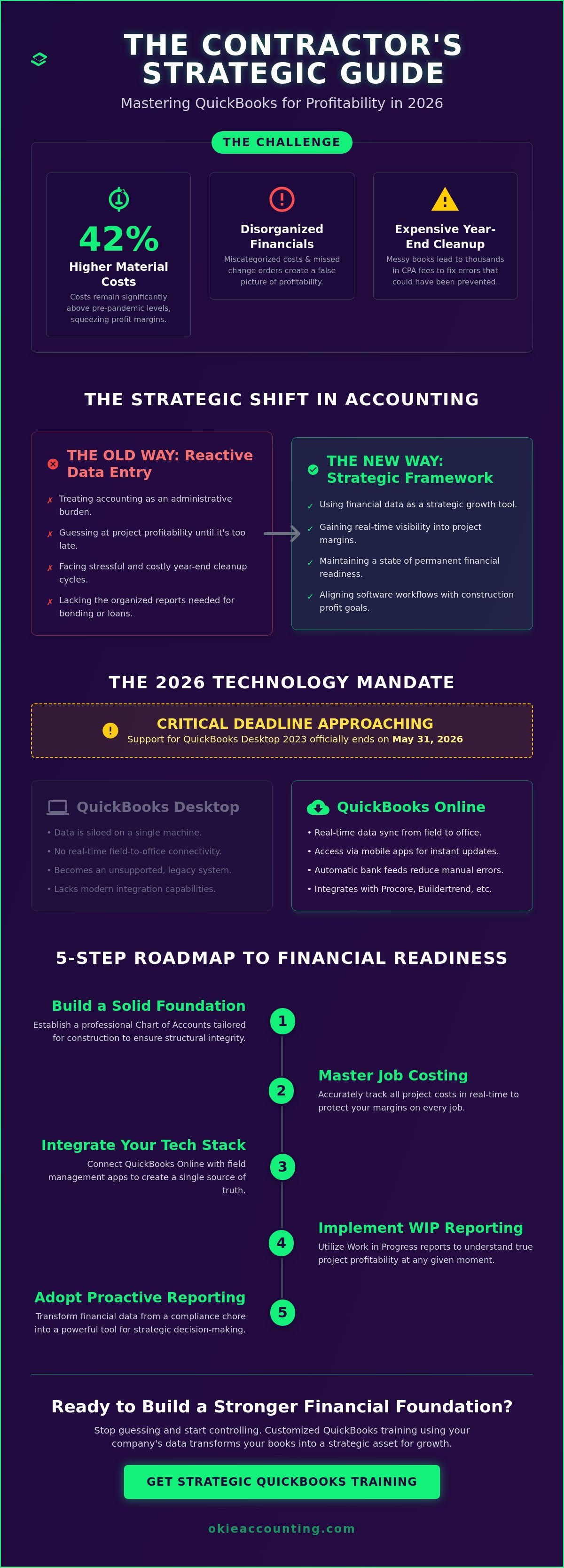
Avoiding the 'Cleanup' Trap: A Roadmap for Construction Financial Literacy
Financial literacy for a contractor isn't about becoming an accountant. It's about developing the discipline to interpret the data your system produces. Many firms fall into the "cleanup trap," where they spend thousands of dollars every year-end to have a professional fix twelve months of chaotic data entry. This reactive cycle prevents you from making proactive decisions. To move from messy books to a lender-ready position, you need a structured roadmap that prioritizes structural integrity over administrative speed. Implementing specialized QuickBooks training for contractors is the catalyst for this transformation, allowing your team to maintain the system rather than constantly repairing it.
A reliable financial roadmap typically follows five distinct stages. First, you must diagnose and resolve historical errors through a thorough cleanup. Second, you align your Chart of Accounts with construction industry standards. Third, you integrate field workflows so that data flows naturally into your software. Fourth, you provide your staff with the technical skills to manage these processes. Finally, you transition to a model of strategic oversight, where you use your reports to drive growth. This progression ensures your business is prepared for the 2026 financial environment, including the reinstatement of 100% bonus depreciation for equipment placed in service after January 19, 2025.
The Weekly Financial Rhythm
The most effective way to avoid the cleanup trap is to replace monthly "cramming" with a weekly financial rhythm. We recommend a dedicated session every Friday to review open invoices and unpaid bills. This habit ensures that your cash flow projections remain accurate and that no change orders have slipped through the cracks. Reconciling your bank feeds weekly, rather than waiting for a monthly statement, allows you to catch duplicate entries or missed expenses while the details are still fresh in your mind. For firms that have outgrown basic bookkeeping, our Fractional Controller services provide the high-level oversight needed to verify these weekly rhythms are producing reliable data.
Identifying Red Flags in Your QuickBooks File
You don't need to be an expert to spot a failing financial system. There are specific red flags that indicate your QuickBooks file requires immediate attention. Look for accounts titled "Uncategorized Asset" or "Opening Balance Equity" on your Balance Sheet. These are often "catch-all" buckets used when a user doesn't know where to code a transaction. Another major warning sign is a negative balance in a liability account, such as Sales Tax or Payroll Liabilities. These errors suggest that payments are being recorded without being properly matched to the underlying debt. If these issues persist, a professional cleanup is usually the first step before any effective QuickBooks training for contractors can begin. To get an expert assessment of your current file health, you can request a diagnostic review today.
Elevate Your Operations with Professional QuickBooks Consulting
Generic training often leaves construction teams stuck in a loop of technical questions without strategic answers. Okie Accounting Group LLC bridges this gap by moving beyond standard tutorials to provide an implementation framework built on your firm's specific project history. This customized approach to QuickBooks training for contractors utilizes your live financial data to solve existing bottlenecks. It's about ensuring your internal systems are as robust as the structures you build in the field. By focusing on your actual ledger, we turn abstract accounting concepts into practical management tools.
Strategic leadership is the differentiator between a firm that survives and one that scales. Professional oversight ensures that your workflows are designed to handle the complexities of the current market without creating additional administrative burden. When your team understands the "why" behind the "how," they become more invested in data accuracy. This shift in perspective transforms your financial department from a cost center into a source of competitive intelligence.
The Fractional Controller Advantage
Sarah O’Quinn’s specialized experience in construction finance allows Okie Accounting Group LLC to offer insights that generalist bookkeepers simply don't possess. By integrating Fractional Controller services with your training, you gain a high-level advisor who monitors the structural health of your data. This professional oversight maximizes the ROI of your software investment by reducing administrative friction and increasing overall team billability. We don't just teach you where to code an invoice; we provide the oversight needed to ensure those invoices reflect the true economic reality of your projects.
Next Steps for Your Construction Firm
Moving your firm toward a cloud-based, strategic system is no longer optional for those seeking long-term stability in 2026. Preparing for your first session involves a deep dive into your current file to identify the red flags discussed earlier in this guide. This diagnostic phase ensures your training isn't just a temporary patch, but a permanent foundation for growth. We invite you to book your discovery call today to build a structural framework for your firm’s growth. Our QuickBooks training for contractors provides the clarity needed to lead your company with quiet confidence and data-driven precision.
Securing Your Construction Profitability in 2026
Transitioning from financial complexity to operational clarity requires more than just software; it requires a disciplined framework. By implementing the technical workflows and weekly rhythms discussed in this guide, you protect your project margins from the "hidden" losses that often erode profit in a volatile market. You now have the roadmap to move beyond basic administrative tasks and toward a professional system that supports long-term stability.
Specialized QuickBooks training for contractors serves as the final piece of this puzzle. Okie Accounting Group LLC provides the specialized expertise in construction and real estate accounting needed to navigate these niche complexities with precision. Our team offers Fractional Controller oversight to drive strategic growth and nationwide remote support for cloud-based accounting systems, ensuring your firm remains lender-ready and resilient.
Ready to stop guessing and start growing? Book your Discovery Call with Okie Accounting Group LLC.
You have the tools to turn your financial data into a strategic position of strength. Lead your firm with the quiet confidence that comes from total control over your financial future.
Frequently Asked Questions
What is the best version of QuickBooks for a construction company in 2026?
QuickBooks Online Advanced is the industry standard for scaling contractors who require robust job costing and custom reporting. It provides the necessary "Projects" module for tracking profitability and offers custom fields to capture specific site data. Since support for Desktop 2023 ends on May 31, 2026, transitioning to the cloud is a strategic move to ensure your financial systems remain supported and secure.
Can QuickBooks Online handle complex job costing and WIP reporting?
Yes, QuickBooks Online handles job costing and WIP reporting effectively through its Projects feature and class tracking. By mapping labor and materials to specific projects, you can generate reports that reflect your actual stage of completion. Our QuickBooks training for contractors focuses on configuring these modules to ensure your balance sheet remains accurate throughout the project lifecycle.
How long does it take to train my office staff on construction-specific QuickBooks workflows?
Most office teams reach proficiency in construction-specific workflows within four to six weeks of consistent application. The timeline depends on the complexity of your current project load and the state of your existing data. We focus on establishing a weekly financial rhythm first, which provides immediate clarity while the staff builds more advanced skills in progress invoicing and retainage management.
Do I need a separate project management software if I use QuickBooks Online?
You don't necessarily need separate software if your primary goal is financial oversight and basic job tracking. QuickBooks Online provides robust tools for managing costs, invoicing, and project profitability. However, firms requiring detailed site logs, daily reports, or complex scheduling often integrate QBO with specialized tools like Procore to create a unified data ecosystem between the field and the office.
What is the difference between a general bookkeeper and a construction-specialized QuickBooks trainer?
A general bookkeeper focuses on basic administrative entry, while a specialized trainer builds a comprehensive structural framework for your specific industry. Construction accounting involves unique complexities like over-billings, under-billings, and insurance compliance. A specialist understands these mechanics and ensures your software workflows protect your margins rather than just recording historical transactions.
How do I track retainage or retention payments in QuickBooks?
You track retainage by creating specific "Retainage Receivable" and "Retainage Payable" accounts on your Chart of Accounts. This allows you to exclude these amounts from your current cash flow while keeping them visible on your balance sheet. Strategic QuickBooks training for contractors ensures you set up these items correctly so that final payments are never overlooked during project closeout.
Can QuickBooks help me manage Davis-Bacon or prevailing wage payroll compliance?
QuickBooks assists with prevailing wage compliance when configured with a compatible payroll integration or specialized reporting tools. While the core software doesn't automatically generate certified payroll reports, it captures the labor data necessary for these filings. We help you establish the workflows required to track labor hours by job and labor class to simplify your compliance reporting.
Is it better to hire an in-house bookkeeper or use a specialized accounting firm for training?
Hiring a specialized accounting firm for training provides a higher ROI by introducing a Fractional Controller perspective to your operations. External specialists identify systemic red flags that an in-house bookkeeper might miss. This proactive oversight ensures your staff learns best practices that prevent expensive year-end cleanups and prepare your firm for bonding and lending opportunities.


Comments